What Is Kubernetes and Why Developers Use It for Container Management
Kubernetes Khronicles is a series from Vultr highlighting information and insights about Kubernetes open-source container orchestration. In this post, David Dymko, Vultr's Cloud Native Technical Lead, explains exactly what Kubernetes is and shares details about the inner workings of the container orchestrator.

Kubernetes has become the mainstream open-source orchestration tool for
automating deployment, scaling, and management of containerized applications. Originally designed by teams at Google
and released in 2014, Kubernetes is now officially maintained by the Cloud Native
Computing Foundation. Kubernetes has quickly turned into the gold-standard of container orchestration for several
reasons: the wide community support, the fact that it is cloud agnostic (kind of... see more about plugins below),
and it offers production-grade orchestration.
The following is a dive into what Kubernetes is, how it works, common Kubernetes terms defined, and details on how
developers are using Kubernetes to build and scale.
What is Kubernetes?
Kubernetes comes from the Greek word for "helmsman," (someone who steers a ship, like a container ship), which
explains why the iconic symbol for Kubernetes (or K8s) is a ship wheel. Kubernetes is an open source container
orchestration tool, that allows developers to quickly and easily deploy, scale and manage containerized
applications.
Here's another way to think about it: Kubernetes is a tool that allows you to manage all cloud computing,
treating them as 1 giant resource pool instead of multiple instances. Instead of having several servers running
with various CPU and memory resources (which you may not be using to full capacity of the CPU power and memory
pool), Kubernetes will try to optimize the allocation of all compute resources, utilizing the ones you are
paying for to the fullest.
Kubernetes is a fan-favorite thanks to some key differentiators:
- Kubernetes for self healing & scalabilityLet's say we deploy a container and we always want 2 instances of it running. Kubernetes will
monitor and make sure there are always 2 running. If one was to ever crash it will then spin up a new
instance to ensure your desired state of 2 are running.With scalability, if we decide that we
always want 5
instances running instead of 2, we can have 5 copies of
that instance running instead of 2 within a few keystrokes. This is possible only IF there are
enough worker node resources to support this...but if you have the cluster
autoscaler, it will automatically deploy a new worker node, if needed. - Bin packing with KubernetesAllows for defining how much CPU and RAM your container will need. Kubernetes will ensure the
container has the
requested resources available, which will then select the appropriate worker node. This can lead to
cost
reduction as you don't waste CPU/Memory. - Load balancing with KubernetesIf you have multiple containers of your application running then Kubernetes will distribute traffic
across those
containers. - Kubernetes service discoveryWhen you deploy your containers, you can expose them through a Kubernetes type called a service,
which behaves
like DNS.
This allows
your containers to easily communicate with one another.
How does Kubernetes work?
Kubernetes works by deploying a master node containing the control plane. The control plane has various
components such as:
- ETCD:This a key/value store that contains all of your clusters configurations
- Kube Scheduler:This looks at your requested configuration and determines the best place for it
- Kube Controller Manager:The controller watches state within your cluster and works toward ensuring
that the desired state you have defined is the one present. - API-Server:This is the heart of your cluster. All components within the control plane and outside of
the control plane communicate with the API server.
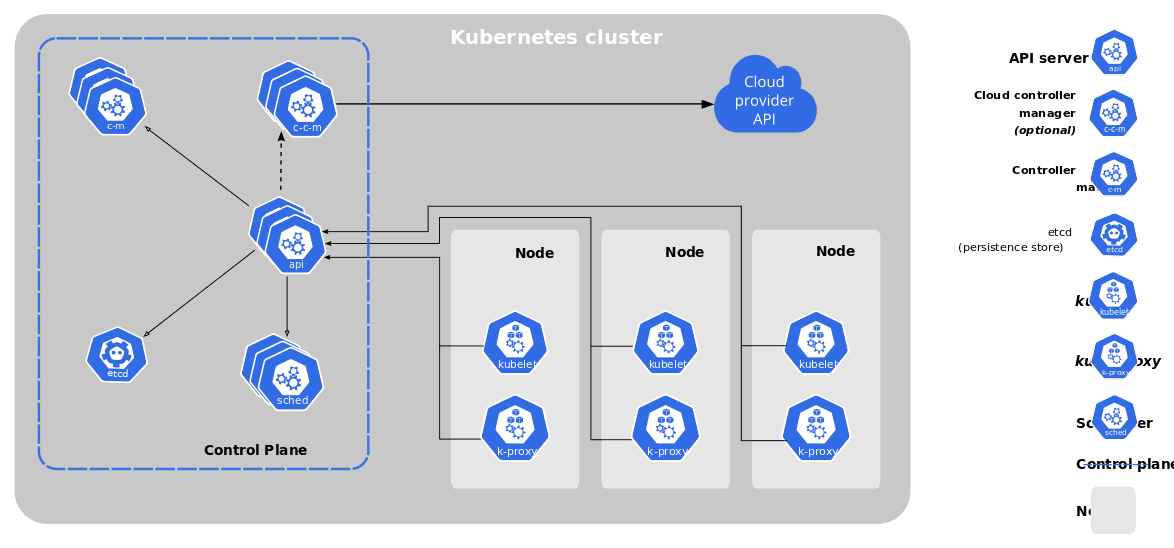
While the control plane acts like the brain of the operation, the worker nodes are where you would deploy
applications. The worker node then communicates back to the control plane, with a few components that run on the
worker node itself.
- Kubelet: This is considered the "Node Agent" it registers the worker node to the control plane and
also
manages pods on it's given node. - Kube Proxy: This is a network proxy that runs on each worker node and manages network configuration
across
your cluster. - Container Runtime: Which container runtime your cluster is using depends on the cloud provider. A popular runtime is ContainerD.
Kubernetes plugins
Since Kubernetes is cloud-agnostic, each provider is responsible for offering two core plug-ins. These are vital
in order to gain the full benefits of the cloud you're running on:
When you deploy Vultr Condor (a terraform module that provisions a Kubernetes cluster with the Vultr CCM and CSI), all these plugins are already
set-up. In other words, your cluster easily becomes Vultr-ready.
Other Kubernetes Plugins to consider:
SHARE WITH US: What Kubernetes plugins do you find most helpful? Tweet us @Vultr to share your K8s story.
Why Containers? Why Kubernetes?
Containers package applications and their dependencies into a single, lightweight unit that can run consistently across environments. But managing hundreds or thousands of containers manually? That’s where Kubernetes shines.
With Kubernetes, you can:
• Automatically restart failed containers
• Scale applications up or down based on demand
• Roll out updates with zero downtime
• Distribute traffic intelligently across services
How Kubernetes Works (Simplified)
Kubernetes operates using a cluster-based architecture that includes:
• Master Node (Control Plane): Makes decisions about cluster management (scheduling, scaling, health checks).
• Worker Nodes: Where the application workloads actually run.
• Pods: The smallest deployable units that host one or more containers.
• Services & Deployments: Help expose applications and manage how pods are created and maintained.
Think of Kubernetes as the traffic controller and repair crew for your application infrastructure, making sure everything flows, scales, and heals as needed.
Key Features of Kubernetes
• Self-healing: Automatically restarts failed containers.
• Horizontal scaling: Scale apps up/down with a single command or auto-scaling.
• Load balancing: Distributes traffic across pods to keep things responsive.
• Rollouts & rollbacks: Deploy updates safely and revert when needed.
• Storage orchestration: Mount and manage storage volumes on demand.
Where Is Kubernetes Used?
Kubernetes is used by:
• Enterprises managing microservices in hybrid or multi-cloud environments.
• Startups building scalable SaaS platforms.
• DevOps teams aiming for CI/CD automation.
• Cloud providers
Why It Matters
Kubernetes is the backbone of cloud-native development. It’s not just a trend, it’s becoming the standard. For teams embracing agile workflows, microservices, and scalable infrastructure, Kubernetes provides a flexible, robust framework that removes the manual burden of managing containers.
Common Kubernetes terms defined
Before running with Kubernetes, there are some key terms to understand:
- Kubernetes cluster: a set of nodes that run containerized applications.
- Kubernetes operator:an extension to Kubernetes that lets you build your own custom resources.
- Kubernetes node: a worker node, either virtual or physical, depending on the cluster.
- Kubernetes pod: the smallest, most basic deployable object in Kubernetes. A pod
holds containers. A pod can hold 1 or more containers. - Kubernetes secrets: let you store and manage sensitive information, such as
passwords, OAuth tokens, and ssh keys. - Kubernetes service: used if you want to expose a deployment/pod(s) to be accessible
from within the cluster (or outside) - Kubectl: the Kubernetes command-line tool that allows you to run commands against
Kubernetes clusters - Minikube: a tool that lets you run Kubernetes locally.
How are developers using Kubernetes?
With the rise of Microservices,
Kubernetes has risen in popularity as it allows developers to easily build distributed applications.
Microservices provide a way to build and deploy applications. Instead of building single large "monolithic"
applications, you build small "bite size" applications that do one thing and one thing well. You then have
multiple applications that work together but are separate. Since these components are independent of one
another, you can scale certain applications up as needed.
For Example: During Black Friday, you may want to spin up more instances of your POS systems to handle the
influx of transactions. In a "traditional" application you would have to deploy multiple instances of the entire
application, which can be wasteful.
As with Kubernetes, CI/CD
(Continuous integration/Continuous Delivery) also lends itself to microservices. You can completely
automate application deployments. Consider this example: You could have a CI/CD pipeline that will build your
application into a container and then update the Kubernetes configuration to use this latest container all from
just commit code to your repository.
Another example involves using Kubernetes to easily schedule batch jobs. In this use case, you are able to
schedule workloads to run at certain times that fits your needs. With Kubernetes since these are containers this
will be deployed, do its job and then be removed. You don't have to worry about having a dedicated instance just
for this batch job Kubernetes will ensure that your jobs run when you want them to.
Overall, there are two main advantages of microservice design:
- Efficiently manage clouds resources (potential cost savings)
- Scale specific portions of an application independently
About Vultr's Kubernetes Engine
Ready to get started building with Vultr Kubernetes? Gain all the benefits of K8s and Vultr together. Access the Vultr plugin to
Terraform here.
Join the Kubernetes conversation
Spin up your Vultr Kubernetes cluster! Deploy Terraform
Vultr Condor. Browse Terraform
Vultr Modules for
additional resources.
Tell us your Kubernetes story!We'd love to hear from you. Tweet us @Vultr to share.
More links
- Join the Vultr Kubernetes Engine Beta.
- Learn about Kubernetes at Vultr.